PicsArt vs Photoshop Express: Pros and Cons Explained
Choosing between two strong editing apps can feel confusing at first. PicsArt and Photoshop Express both come from trusted names in the photo editing space. PICSARTPROAPK.COM explains the pros and cons of each app to make your choice easier.
Overview of Both Apps
PicsArt is a full creative suite with photo editing, design, and AI tools combined. Photoshop Express is a mobile version of Adobe’s professional editing software with simpler controls. This background shapes how each app performs across different tasks.
What PicsArt Offers
PicsArt provides background removal, AI replace, stickers, and collage tools in one place. It targets users who want both correction and creative design features. The app also includes basic video editing for social content creation.
What Photoshop Express Offers
Photoshop Express focuses on quick photo fixes using Adobe’s trusted editing engine. It offers presets, healing tools, and basic collage options for fast editing. The app suits users familiar with Adobe’s editing style on a simpler mobile scale.
Feature Comparison Table
The table below highlights key differences between both apps.
| Feature | PicsArt | Photoshop Express |
|---|---|---|
| Photo Correction | Strong with AI support | Strong with Adobe engine |
| Creative Tools | Stickers, collage, drawing | Limited creative extras |
| Background Removal | One click AI tool | Available with some limits |
| Video Editing | Built in tool included | Not available |
| Brand Trust | Popular standalone app | Backed by Adobe name |
| File Export | Multiple formats supported | Standard export options |
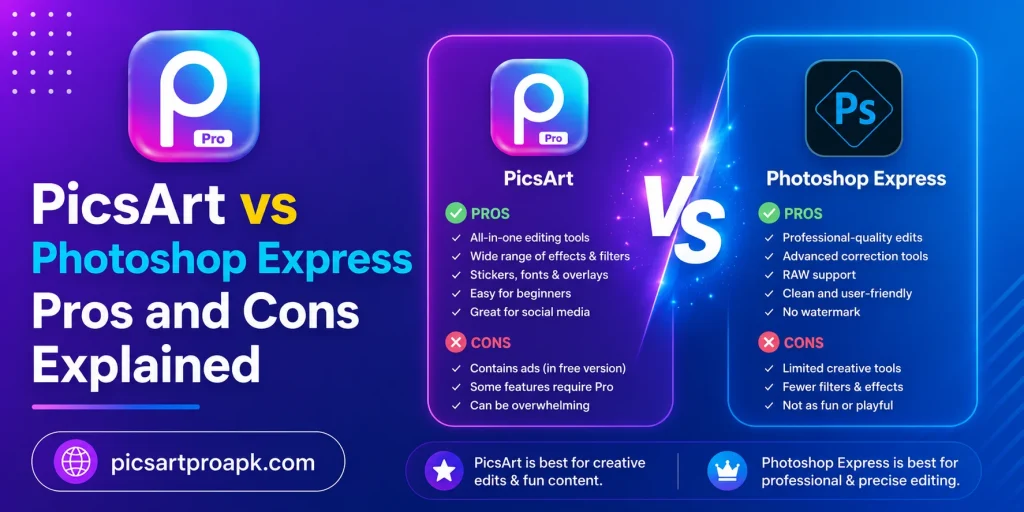
Pros of Using PicsArt
PicsArt offers several advantages for users who want variety in one app.
- Wide range of AI powered editing tools
- Built in stickers, fonts, and collage features
- Video editing included without extra apps
- Strong community for sharing and inspiration
- Regular updates with new creative tools
Cons of Using PicsArt
Some drawbacks exist despite the wide feature set.
- Interface can feel busy for new users
- Some advanced tools require a paid plan
- App size is larger than simpler editors
- Free version includes ads and watermarks
Pros of Using Photoshop Express
Photoshop Express brings its own set of strengths to mobile editing.
- Trusted Adobe editing engine and presets
- Simple and clean interface for quick edits
- Fast healing and correction tools
- Good integration with other Adobe apps
- Reliable performance on most devices
Cons of Using Photoshop Express
There are some limits compared to more feature rich apps.
- Fewer creative and design tools available
- No built in video editing feature
- Limited sticker and font options
- Some tools locked behind a subscription
Editing Quality Comparison
Both apps handle photo correction well but in different ways.
PicsArt Editing Quality
PicsArt uses AI to speed up correction while keeping manual control available. Users can fine tune shadows, colors, and details after automatic adjustments. PICSARTPROAPK.COM highlights this balance as a strength for everyday editing.
Photoshop Express Editing Quality
Photoshop Express relies on Adobe’s proven algorithms for color and light correction. The results often feel polished with minimal manual effort needed. This makes it a strong choice for users wanting reliable quick fixes.
Which App Should You Choose
Your final choice depends on what you value most in an editing app.
- Choose PicsArt for a mix of creative tools and photo correction
- Choose Photoshop Express for simple and reliable quick edits
- Choose PicsArt for stickers, collage, and video editing needs
- Choose Photoshop Express for trusted Adobe style corrections
- Consider trying both apps to see which workflow feels natural
Interface and Navigation Comparison
How easily users can find and use tools affects overall editing speed and satisfaction.
PicsArt Interface
PicsArt organizes tools into categories, though the sheer number of options can feel busy initially. Once familiar with the layout, users can move between photo and video tools efficiently. PICSARTPROAPK.COM offers guides to help new users navigate the interface faster.
Photoshop Express Interface
Photoshop Express uses a simplified, linear layout that guides users through common editing steps. This straightforward design reduces the learning curve significantly for casual users. The trade off is fewer advanced options compared to more feature rich apps.
AI and Automation Features
Both apps have started incorporating automation to speed up common editing tasks.
PicsArt Automation
PicsArt includes several AI powered tools like automatic background removal and image enhancement. These features reduce manual work for common editing tasks significantly. The app continues expanding its AI toolkit with regular updates.
Photoshop Express Automation
Photoshop Express offers one tap auto correction using Adobe’s algorithm based adjustments. This automation focuses primarily on standard photo correction rather than creative AI generation. Users wanting simple, reliable automatic fixes often find this sufficient.
Who Should Choose Each App
Certain user types tend to prefer one app based on their typical editing needs.
- Casual photographers may prefer Photoshop Express for quick reliable fixes
- Content creators often prefer PicsArt for its broader creative toolkit
- Social media users may benefit from PicsArt’s stickers and video tools
- Users familiar with Adobe products may feel more comfortable with Photoshop Express
- Users wanting an all in one app often lean toward PicsArt
Storage and Device Requirements
App size and device compatibility can influence the overall user experience.
PicsArt Storage Needs
PicsArt’s wide feature set results in a larger app size compared to simpler editors. Devices with limited storage should monitor space when installing additional creative assets. Regular updates also add to the overall storage footprint over time.
Photoshop Express Storage Needs
Photoshop Express maintains a smaller app size due to its focused feature set. This makes it a good option for devices with limited available storage. Performance remains smooth even on older or budget friendly smartphones.
Frequently Asked Questions
Is Photoshop Express as powerful as desktop Photoshop? No, the mobile app offers simplified tools compared to the full desktop version. PICSARTPROAPK.COM notes that PicsArt offers more variety for mobile only users.
Does PicsArt require a subscription for all features? Basic tools remain free while advanced AI and design features may need a premium plan. Free users still get access to core editing functions.
Which app is better for social media content? PicsArt suits social content better due to stickers, collage, and video tools. Photoshop Express works well for simple photo corrections before posting.
Can I switch between both apps easily? Yes, both apps support standard photo formats, making it easy to move files between them.
Final Thoughts
PicsArt and Photoshop Express both serve photo editing needs but with different strengths. PicsArt offers more creative variety while Photoshop Express focuses on trusted quick corrections. Visit PICSARTPROAPK.COM to download PicsArt and explore its full editing toolkit today.