Top 10 AI Tools in PicsArt You Must Try
Artificial intelligence has changed how people edit photos and videos today. PicsArt includes a wide range of AI tools that save time and improve creative results. PICSARTPROAPK.COM lists the top ten AI tools worth trying inside the app.
Why AI Tools Matter in Photo Editing
AI tools reduce the manual effort needed for complex editing tasks. They allow beginners to achieve results that once required professional skills. PicsArt has built its AI features around speed, accuracy, and creative flexibility.
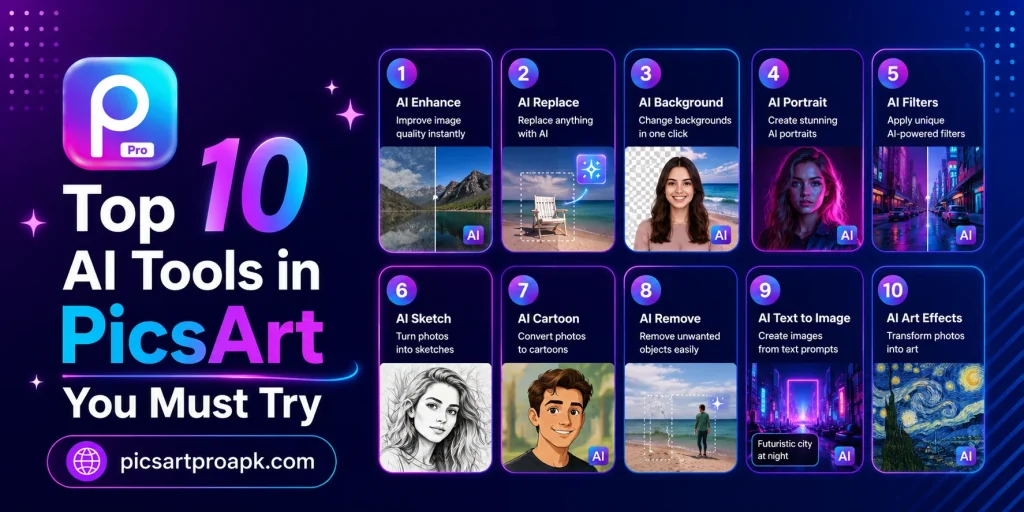
List of Top 10 AI Tools in PicsArt
Below is a detailed look at the most useful AI tools available in the app.
1. AI Background Remover
This tool detects the subject in a photo and removes the background instantly. It saves time compared to manual selection methods. Users can then add a new background or keep it transparent for further design work.
2. AI Replace
AI Replace allows users to swap objects or elements within a photo using text prompts. This tool understands shapes and context to create realistic replacements. It works well for creative edits without needing advanced manual skills.
3. AI Image Generator
This feature turns simple text descriptions into fully generated images. Users can create unique visuals for projects without needing original photos. It supports different styles depending on the creative goal.
4. AI Avatar Creator
The AI Avatar tool transforms a regular photo into a stylized digital character. Many users create avatars for social media profiles or fun sharing. Different themes and styles are available for customization.
5. AI Image Enhancer
This tool improves low quality or blurry photos with a single tap. It sharpens details, adjusts noise, and boosts overall clarity. Old or poorly lit photos benefit greatly from this feature.
6. AI Art Generator
The AI Art Generator turns photos or ideas into artistic styles like painting or sketch effects. This tool suits users who want creative transformations beyond basic editing. PICSARTPROAPK.COM highlights this as a favorite among creative users.
7. AI Writer
This tool helps generate captions, descriptions, or short content for social media posts. It saves time for creators who need quick and relevant text. The writer adjusts tone based on the input provided.
8. AI Quote Generator
Users can create styled quote graphics using this AI powered tool. It combines text generation with design templates for quick output. This works well for motivational or thematic social media content.
9. AI Video Generator
This tool creates short video clips based on prompts or existing images. It supports creators looking to produce content without filming original footage. Results can be further edited using other PicsArt tools.
10. AI Expand
AI Expand extends the borders of a photo intelligently to fit different formats. This is useful for converting photos into banners, thumbnails, or wallpapers. The tool fills new space based on the original image’s style and color.
Comparison Table of AI Tools
The table below summarizes the main use case for each tool.
| AI Tool | Main Use Case |
|---|---|
| Background Remover | Removing photo backgrounds instantly |
| AI Replace | Swapping objects within a photo |
| Image Generator | Creating images from text prompts |
| Avatar Creator | Making stylized digital avatars |
| Image Enhancer | Improving photo clarity and quality |
| Art Generator | Applying artistic styles to photos |
| AI Writer | Generating captions and descriptions |
| Quote Generator | Creating styled quote graphics |
| Video Generator | Producing short AI generated clips |
| AI Expand | Extending photo borders for new formats |
Tips for Using AI Tools Effectively
A few practices help get the best results from these tools.
- Start with clear and well lit original photos
- Use simple and specific prompts for AI generation tools
- Combine multiple AI tools for more creative results
- Review AI output before finalizing any project
- Save original files before applying major AI changes
Best Situations to Use AI Tools
These tools fit a wide range of personal and professional needs.
For Content Creators
Creators use AI tools to speed up content production for social media. Captions, images, and edits can be generated quickly without extra apps. This keeps content schedules consistent and efficient.
For Small Businesses
Business owners use AI features for marketing visuals and product photos. Background removal and image enhancement improve product presentation. PICSARTPROAPK.COM recommends these tools for cost effective marketing content.
For Personal Projects
Everyday users enjoy AI avatars, art styles, and quote generators for personal use. These tools add fun and creativity to casual photo editing. No professional skills are required to achieve good results.
How AI Tools Work Together
Many of these AI features can be combined within a single project for stronger results. Understanding how to layer these tools opens up more creative possibilities.
Combining Background Removal with AI Replace
Removing a background first and then using AI Replace on remaining elements creates more controlled edits. This two step process works well for complex composite images. PICSARTPROAPK.COM recommends experimenting with tool combinations for unique creative outcomes.
Combining Image Generator with Manual Editing
AI generated images often benefit from manual touch ups using standard editing tools afterward. This combination balances speed with the precision of manual control. Users can adjust colors, add text, or crop generated images for specific project needs.
Choosing the Right AI Tool for Your Project
Different projects call for different AI tools depending on the desired outcome.
- For product photos, prioritize Background Remover and Image Enhancer
- For social content, prioritize AI Writer and Quote Generator
- For creative art projects, prioritize Art Generator and Image Generator
- For profile pictures, prioritize AI Avatar creation tools
- For video content, prioritize AI Video Generator alongside standard editing
Performance and Processing Time
AI tools require cloud processing, which affects how quickly results appear.
Factors Affecting Processing Speed
Internet connection quality significantly impacts how fast AI tools generate results. Complex prompts or high resolution requests may also take slightly longer to process. Using a stable connection helps ensure the smoothest experience with these features.
Managing Expectations for Results
AI generated content does not always perfectly match the initial vision on the first attempt. Adjusting prompts and trying multiple generations often leads to better final results. Patience and experimentation are key parts of working effectively with AI tools.
Who Benefits Most From These AI Tools
Various user groups find different combinations of these tools particularly valuable.
- Content creators benefit from writer and quote generation tools
- E-commerce sellers benefit from background removal and enhancement tools
- Digital artists benefit from art generator and image generator tools
- Social media users benefit from avatar creation and expand tools
- Video creators benefit from AI video generation capabilities
Frequently Asked Questions
Are all AI tools free in PicsArt? Some AI tools are available for free with limits, while advanced features may need a premium plan.
Do AI tools require internet access? Yes, most AI features need an internet connection for processing since they rely on cloud based technology.
Can AI generated images be used commercially? Usage rights depend on PicsArt’s terms of service, so checking current guidelines before commercial use is recommended.
Which AI tool is best for beginners? Background Remover and Image Enhancer are the easiest tools for beginners due to their one tap simplicity.
Final Thoughts
PicsArt’s AI tools make photo and video editing faster, easier, and more creative for every user. From background removal to AI generated art, these features cover a wide range of needs. Visit PICSARTPROAPK.COM to download the app and explore these AI tools for yourself.